


Two years ago we ran our customer support on Zendesk, with five agent seats. It did the job, but every month we were paying per seat for features we barely used, our support history lived on someone else's platform, and connecting tickets to our project management system meant paying for yet another seat.
So we did what we do for our clients: we looked at how our team actually works, and built a support portal around it. Here is what we built, how we moved across without losing a single conversation, and what it has saved us since.
Why we moved away from Zendesk
- Per-seat pricing adds up. Five agent seats are a fixed monthly cost that grows every time the team does, whether or not each seat is used every day.
- Our data lived on someone else's platform. Customer conversations are some of the most valuable data a business has. We wanted them in our own database, under our own backup, retention and access rules.
- Integrating Jira cost extra. Most support requests end up as work for our developers, which we manage in Jira. Linking the two meant paying for an extra seat on Zendesk or Jira just so tickets and issues could talk to each other.
What we built
Our support portal runs on AWS, using managed services wherever we can so there is very little to look after. When a customer emails our support address, the message flows through the platform like this:
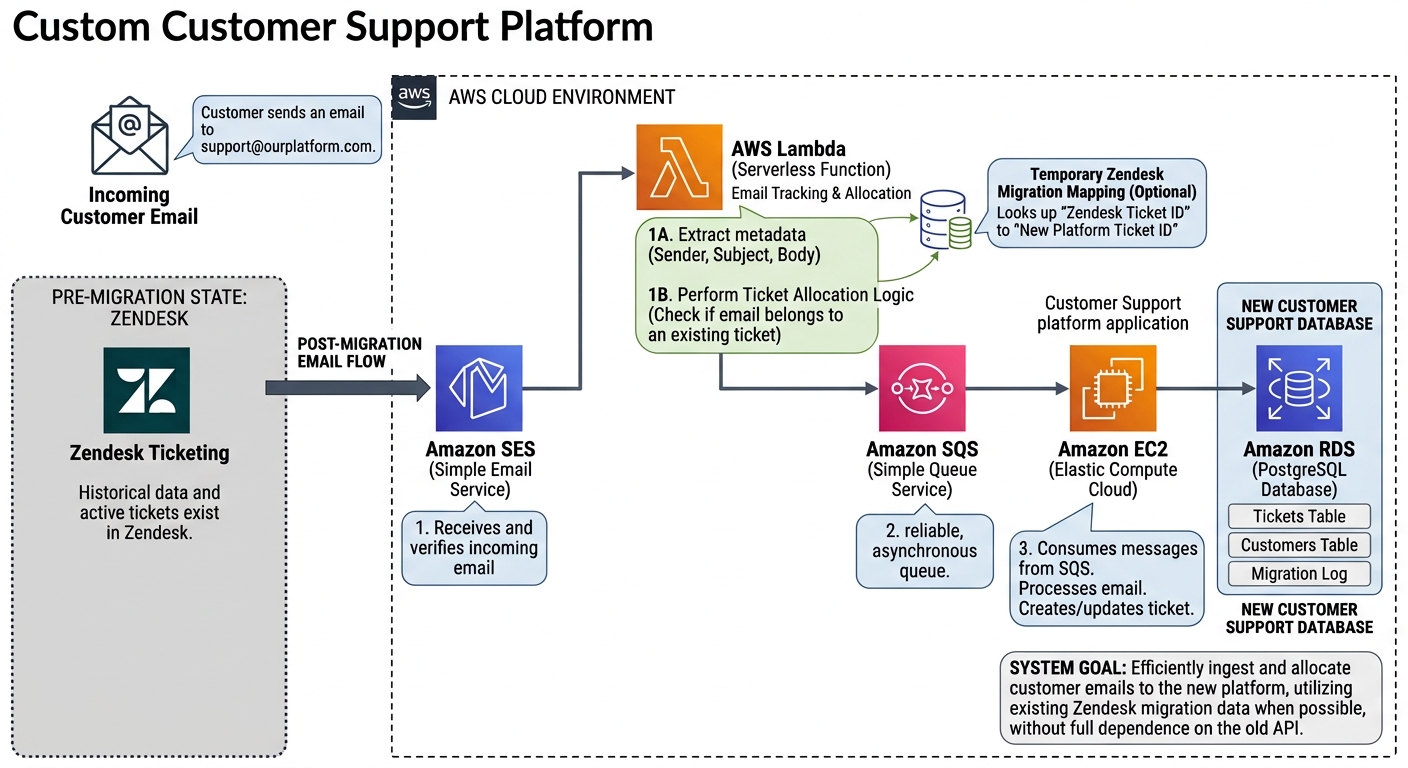
- Amazon SES receives the email and verifies it.
- AWS Lambda reads the sender, subject and body, and works out whether the email belongs to an existing ticket. During the migration it also checks a temporary mapping from old Zendesk ticket IDs to new ones.
- Amazon SQS queues the message reliably, so nothing is lost during busy periods or while we deploy updates.
- Our support application on Amazon EC2 picks up each message, then creates a new ticket or adds the reply to an existing one.
- Amazon RDS (PostgreSQL) stores everything: tickets, customers and a log of the migration.
Moving across without a big-bang switchover
The part that worries most teams is the move itself. We imported our historical data and active tickets from Zendesk, and kept a simple mapping between each old Zendesk ticket ID and its new ticket. When a customer replied to an old Zendesk email thread, the reply still landed on the right ticket in the new portal.
Because the mapping lives in our own database, the new platform never depended on the Zendesk API to work. Once the old threads went quiet, the mapping simply stopped being needed.
What it changed for us
- About 75% lower running costs. The hosting for the portal, the EC2 server and the database, costs about 75% less than we were paying for five Zendesk agent seats. The other AWS services in the flow cost very little at our volume.
- The savings paid for the build. Because the portal costs so little to run, the money we no longer spend on Zendesk seats has covered the cost of developing it. From here on, every month is a straight saving.
- Full control of our data. Every ticket and customer conversation lives in our own database, in our own AWS account. We decide how long it is kept, how it is backed up and who can see it.
- Jira built in, not bolted on. Tickets link straight to Jira issues, so developers see the customer context and support sees progress, without paying for an extra seat on Zendesk or Jira.
- A tool that fits how we work. New fields, views or automations are a small change we make ourselves, rather than a reason to move to a more expensive plan.
Is a custom support portal right for your business?
Not always. If you need live chat, phone support, AI agents and a public help centre across many channels, a platform like Zendesk gives you a lot out of the box.
A custom portal starts to make sense when:
- most of your support happens by email,
- your team size is steady and per-seat costs keep adding up,
- you want your customer data in your own systems,
- or support needs to work closely with tools you already use, like Jira, your CRM or your own product.
It is also a lower-risk project than it sounds. Because the running costs are so low, the money saved on licences can pay back the development itself, and after that the savings are yours to keep. A proof of concept can run alongside your current helpdesk on one inbox, so you can see it working before you switch anything off. If your helpdesk bills are growing faster than your team, we would be happy to talk it through.
Paying more for your helpdesk every year?
Tell us how your team handles support today. We'll give you an honest view of whether a custom portal would pay for itself, and show you with a proof of concept.
Explore custom software development →